Brawl Stars Account Tracker: Stats and Progress – BrawlOne
Brawl Stars account tracker guide: track brawlers, gadgets, gears, star powers, trophy history, battle logs, and plan upgrades with soft-cap goals.
Table of Contents
You can use a Brawl Stars account tracker to turn scattered stats into a clear plan. You’ll see your trophy swings, recent battles, and exactly where each brawler stands on levels, gadgets, and star powers. It also helps you estimate upgrade costs and spot the best next spend for coins and Power Points. But once you connect your player tag, a few small choices matter more than you’d expect…
Brawl Stars Account Tracker Overview
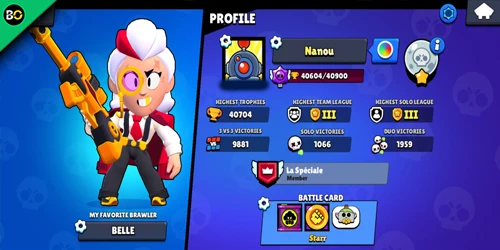
Whether you’re checking your progress or planning your next upgrade, the Brawl Stars Account Tracker gives you a clean snapshot of your account in one place—your player name and tag (#XXXXXX), XP level and total XP, last updated time, and both current and highest trophies—then backs it up with deeper stats like 3v3/solo/duo victory totals, recent win‑loss‑draw percentages, a full brawler collection breakdown (levels, average trophies, gadgets, star powers, and Level 11 progress), plus trophy history, battle logs, and planning tools that track coin and Power Point spending while guiding you through Soft‑Cap and Hard‑Cap quests. Use your brawl stars player tag to pull your profile fast. You’ll treat it as a brawl stars progress tracker, skim brawl stars trophy history trends, and review each brawl stars battle log for smarter decisions.
What a Brawl Stars Account Tracker Shows
A Brawl Stars account tracker shows your brawler collection at a glance, including which gadgets, gears, and star powers you’ve gained access to and which upgrades you still need. You can track your trophy history with current and highest trophies, then review battle logs to see recent modes, maps, rosters, results, and trophy swings. It also summarizes profile stats and helps you plan coins and Power Points so you can prioritize the next upgrades.
If you’re tracking performance trends, compare your results with the latest Brawl Stars Tier List to see which brawlers dominate the current meta.
Brawler Collection and Equipment (Gadgets, Gears, SP)
Since you can’t optimize upgrades without seeing everything you own, a Brawl Stars account tracker lays out your full brawler collection and equipment in one place—showing your total owned brawlers ({{playerBrawlerCount}} / {{maxBrawlerCount}}), each brawler’s current level and progress to Level 11, plus your Gadgets, Gears, and Star Powers with clear owned/total counts ({{playerGadgetCount}} / {{maxGadgetCount}}, {{playerStarPowerCount}} / {{maxStarPowerCount}}) so missing pieces stand out immediately. With a brawl stars profile tracker, you drill into any brawler to see upgrade costs, then plan coin and Power Point spending across your roster. You also track quest milestones: hit Soft-Cap when a maxed brawler has required brawl stars gadgets, brawl stars gears, and brawl stars star powers; hit Hard-Cap when you’ve bought everything, earning profile icons.
Trophy History, Battle Logs, and Profile Stats
Seeing your full brawler collection and equipment is only half the picture—an account tracker also shows how your trophies and performance change match by match. With a brawl stars account checker, you can review brawl stars trophy history for your profile and each Brawler, including current and highest totals plus a graph of recent gains and drops. A battle logs tracker then breaks down each match so you can spot patterns and adjust your push, whether you use brawlify brawl stars or another tool. Profile stats brawl stars also summarize your overall results and update time.
- Recent matches, modes, maps, and outcomes
- Full rosters and per-match trophy changes
- Opponent profile links for deeper comparisons
- Win/defeat/draw counts and percentages
- Sorting to find your hottest Brawlers
Coins and Power Points Planning
Track every Coin and Power Point like a budget so you always know what you can upgrade next without stalling. Your tracker shows live balances plus spend-and-earn graphs, so you can spot where resources vanish across sessions. It also totals what each brawler needs to hit the brawl stars soft cap (max level) and the brawl stars hard cap (all gears, gadgets, and star powers), so you won’t guess your upgrade order.
As a brawl stars upgrade planner, it compares your Coins/Power Points to upcoming costs and quest rewards, then suggests the next purchase to avoid shortfalls. Per-brawler bars show Power Points, Coins spent, owned gear, and the remaining cost to Level 11. With brawlytix brawl stars, you can even forecast matches or time needed using recent earnings and season bonuses too.
How to Use a Brawl Stars Account Tracker to Upgrade Faster
To upgrade faster, you’ll use your account tracker to choose whether you’re chasing a Soft-Cap (Level 11 with required items) or a Hard-Cap (every available piece of equipment). Once you pick a cap, set quest goals and milestones so your coins and Power Points go to the brawlers closest to completion first. As you clear each milestone, you’ll see your next best upgrade path and keep your progression focused.
Soft-Cap vs Hard-Cap Explained
While you’re upgrading brawlers, understanding the difference between Soft-Cap and Hard-Cap helps you spend coins and Power Points faster and smarter with an account tracker. Soft-Cap means you’ve pushed a brawler to Level 11 and bought all required Items, so you can sort “needs Items” to see who’s closest and spend coins where they’ll spike power fastest. Hard-Cap goes further: you buy every available Gadget, Star Power, and all tracked gear, so the tracker highlights exactly what purchases still block full completion.
- Sort brawlers by “needs Items” to target near Soft-Caps
- Check Level 11 progress to avoid wasted Power Points
- Use the expenditure planner to estimate required coins
- Compare weekly earnings against upgrade costs
- Watch quest indicators and profile icons update in real time
Setting Quest Goals and Milestones
Because upgrade resources disappear fast, setting clear quest goals and milestones inside a Brawl Stars account tracker keeps every coin and Power Point pointed at the fastest wins: finish Soft-Cap icons first by prioritizing brawlers already at Level 11 or closest to it, then shift your weekly budget to one Hard-Cap candidate at a time (gadgets, star powers, and gears) based on meta value and the modes you play most. Use the Soft-Cap quest list to sort by lowest remaining cost, and knock out quick completes for more icons. Next, set a Hard-Cap milestone by tracking missing gadgets, star powers, and gears, starting with high meta picks like Frank 9.2, Emz 9.1, or Bibi 8.7. Check trophy history and battle logs to buy during low-play stretches.
How to Find Your Player Tag for Brawl Stars Account Tracker
- Home screen top-left
- Profile page under name
- Copy the full tag
- Enter it with #
- Store friends’ tags
Best Tips to Use a Brawl Stars Account Tracker Safely
After you’ve copied your player tag and plugged it into a tracker, keep your account safe by sharing only that public tag (formatted #XXXXXX) and nothing else. Pick trackers that clearly say they’re not affiliated with Supercell and that they follow the Fan Content Policy, so you never hand over your Supercell ID or password. Look for privacy controls like “Do Not Sell or Share My Personal Information” and opt-out buttons, plus a visible privacy policy and legal notices. Confirm the tool uses public API data only, limits what it shows to trophies, brawler collection, and outcomes, and doesn’t publish full battle logs without consent. Check “last updated” timestamps and daily refreshes. Finally, choose services that let you delete stored tags and confirm removal.
Frequently Asked Questions
Can the Tracker Import Data Automatically or Require Manual Entry?
You can import data automatically if you connect your account or provide your player tag; you won’t need much manual entry. You’ll only enter edits for missing items, custom goals, or planned upgrades later.
Does It Work for Multiple Accounts on One Device?
Yes, you can use it for multiple accounts on one device, but you'll switch profiles manually unless it supports automatic tag-based syncing. You’ll keep separate progress, spending, and quest milestones for each account.
How Often Is Brawler Data Updated After Game Patches?
You’ll see brawler data update after patches as soon as the game’s API reflects changes—often within hours, sometimes 24–48 hours. If new content appears, you may need to refresh or re-sync your account.
Can I Export My Progression Plan to a Spreadsheet or PDF?
Yes—you can export your progression plan to a spreadsheet, and you can usually generate a PDF via print-to-file. You’ll download CSV/XLSX for brawlers, costs, and goals, then share or archive it easily.
Are Milestone Profile Icons Usable In-Game or Only Within the Tracker?
You can’t use those milestone profile icons in-game; you’ll only see them inside the tracker. They act as achievement badges for completing quests and caps, helping you showcase progress and plan what to do next.
Conclusion
You get more out of Brawl Stars when you track what matters. With an account tracker, you can see your trophy trends, recent battles, and your full brawler inventory in one place, then spot upgrade priorities and forecast the coins and Power Points you’ll need. Once you’ve entered your player tag, you can plan smarter quests and avoid wasted spending. Stick to trusted tools, protect your tag, and you’ll progress faster with confidence.